MaxelTracker

MaxelTracker
Know exactly where your team's time goes. MaxelTracker gives managers clear, real-time visibility into team productivity — no spreadsheets, no guesswork. Built for businesses of every size.

In the real world, the majority of us waste time in the workplace. Especially, when one is at a managerial position with the constant requirement of interacting with the other people, it is hard to focus and direct one’s time to one thing for a longer period of time.
Nearly 90% of employees admit to wasting time. It is not that a person is wasting time intentionally or willingly. It is just that the workplace, workflows, and work responsibilities do not allow one to use time effectively.
Having said that, we are also not saying time waste causes are always external. Self interruptions are one of the biggest time wasters. And it has only increased with the advent of smartphones, social media, and mainstream access to the internet.
A Pew Research Center survey of American adults found that 34% of workers use social media while at work to take a mental break from their job.
In this post, we will look at the most common time wasters in the workplace both external and self-generated, how these can affect the performance, and how to protect your time.
Time wasters are work activities, interruptions, or habits that consume time without contributing enough value.
Common time wasters in the workplace are constant interruptions, unnecessary meetings, social media browsing, workplace communication, task switching, procrastination, and AI slop.
To reduce time wastage, track how you spend time, create a schedule, and protect your time.
Time wasters at work are activities, interruptions, habits, or inefficient processes & workflows that consume working time without contributing enough value.
Some are obvious, such as unnecessary meetings, social media browsing, or excessive workplace chatter, while others look like important work but consume more time than they add such as workplace emails and messages, searching for information, repetitive administrative tasks, and task switching.
Identifying time wasters helps you understand where your working hours are actually going and where you can recover time. It helps you protect focused work, reveals hidden time drains, helps you prioritize better, reduces operational inefficiencies, and creates more time for valuable work.
“ Read more: Where Does Your Team’s Time Really Go? The Data Every Organization Should See
The most common time wasters in the workplace are constant interruptions, unnecessary meetings, social media browsing, workplace communication, task switching, procrastination, and AI slop.
Interruptions are the biggest time wasters in the workplace. You try to focus on one thing, and you get a ping on Slack or Teams for an update. You try to work on a task, and an unplanned, urgent request disrupts your flow. You finally rebuilt focus, and a coworker asks for help.
And interruptions are not just work related. Coworker drop‑ins, office chatter, personal phone calls, open‑office noise, and social media browsing keep disrupting your flow.
Each interruption breaks your flow, because attention has to be rebuilt afterwards. According to a University of California, Irvine study, it takes an average of 23-25 minutes to regain deep focus after a single workplace interruption.
Reserve focused blocks of time in the day for deep work.
Communicate with coworkers about your dedicated blocks of focused time and tell them not to disturb you during those hours unless critical.
Use headphones or other visual signals such as "Do Not Disturb" status to prevent interruptions.
Meetings also waste significant time at the workplace. Roughly 47% of employees say meetings are the single biggest time-waster at work. Especially, when they do not have a clear agenda, it is a complete waste of time.
In Microsoft's India research, 46% of workers said their absence from half of meetings would go unnoticed by colleagues. Thus, eventually, employees spend time attending meetings where they have little to contribute.
Meetings simply consume your time that could be utilized. Not just that, attending unnecessary meetings break your flow, consume energy, and fragment your day.
Having said that, we are not saying you should stop holding meetings but avoid the inefficient ones that could have been handled by email or chat.
Ask for an agenda and whether your participation is needed before the meeting starts. If it is not necessary, do not attend.
Use email or chat when the discussion doesn't require a meeting.
Set a time limit. Keep meetings as short as necessary.
Social media browsing also contributes significantly to time wastage in the workplace. Just a few years ago, social media browsing was not a big issue, but the mainstream access to the internet and smartphones has increased social media browsing at the workplace.
On average, a person spends 40-45 minutes on social media every day in the workplace. And we all know this by our personal experience, this short break can easily turn into a long one without being aware of it.
In the paper The Cost of Interrupted Work: More Speed and Stress, Gloria Mark reported that after only 20 minutes of interrupted performance people reported significantly higher stress, frustration, and pressure.
It breaks your focus and wastes time that could be used for work. In addition to that, if checking social media or personal messages becomes a response to every moment of boredom or difficulty, it can repeatedly pull attention away from important tasks by adding to context switching.
Keep personal browsing to breaks. Avoid mixing personal activities with work activities.
Keep your phone away. Put your phone out of reach when working on important tasks.
Track the time spent on apps and websites. Block distracting websites on the desktop or mute apps notifications during deep work time.
Slack or Teams messages and emails are among the common time wasters in the workplace. Microsoft's 2025 telemetry data found that the average Microsoft 365 worker is interrupted every two minutes during core work hours, leading to significant time wastage.
Frequent messages and quick checks break focus and can turn into long discussions leading to fragmented work sessions and time wastage. It is not that these messages are not work related and unnecessary but they break concentration and interrupt flow. We are not saying do not collaborate but use time management techniques like time blocking and task batching to protect your focused time for deep work.
Create a focused block of time for deep work. Disable non-essential notifications in those time blocks. Only respond to crucial messages.
Check emails and messages at set times. Batch non-urgent communication and updates together instead of responding to each one immediately. Avoid monitoring your inbox and chat continuously.
Use status indicators to let coworkers know when you're unavailable or focused.
Task switching is one of the biggest time wasters for working professionals who are in senior roles such as team lead, managers, and experienced team members. It is because they receive requests from multiple sources.
On the surface, multitasking such as switching between a report, email, chat messages, spreadsheets, and other tasks may feel productive, but it divides your attention and creates another form of wasted time.
Microsoft's research found that 68% of people don't have enough uninterrupted focus time during the workday.
Task switching makes it harder to maintain concentration and increases the time required to complete individual tasks. When your workday is fragmented by constant communication, urgent task requests, and meetings, even a relatively simple task can become difficult to complete.
Plan your day. Work on one priority at a time. Give your attention to the task that matters most.
Group similar tasks such as communication, administrative, and deep work and work in batches.
Starting the day without a clear plan or prioritized list of tasks results in working on easy tasks first while important work gets pushed back. Also, when you do not have a clear plan for the day, urgent requests can repeatedly take priority over work that has greater long-term value. It is a personal poor time management habit that requires self-assessment.
Poor prioritization can leave you busy throughout the day without making meaningful progress on your most important responsibilities.
Identify your highest-priority tasks.
Separate urgent from important. An urgent request isn't always the task with the greatest impact.
Limit your daily priorities. Focus on a small number of important outcomes.
Use time tracking insights to review your performance and make iterations to plan.
Lack of standard workflows and poorly defined processes can lead to time wastage. It creates a duplicate effort on correcting work that was done incorrectly. Employees spend time figuring out what to do, waiting for clarification, or reworking when requirements change midway through the work or completed work has to be redone.
Asana's research found that the average knowledge worker spends 352 hours talking about work over the course of a year.
A lack of clear processes, workflows, and requirements means rework. Tasks that should take an hour often take much longer.
Document processes. Create clear instructions for regular tasks.
Define responsibilities. Make it clear who owns each step.
Clarify requirements early. Confirm expectations before starting significant work.
Procrastination is another common source of wasted time. It happens when a task feels difficult, boring, or overwhelming, or you want to achieve perfection. Instead of starting the task, employees may check email, organize files, browse the internet, or complete easier tasks and delay the most important tasks.
Delaying important work reduces the time available to complete it and turns manageable tasks into last-minute work. It can also push employees toward working under unnecessary deadline pressure and lead to stress.
Break large tasks into smaller steps. Make the first action specific and manageable.
Start with the most important task. Avoid filling the beginning of your day with low-value activities.
Set a deadline. Give yourself a clear time by which the task or milestone must be completed. Track time to see how long the work actually takes.
AI slop is the newest addition to the common time waster in the workplace. AI slop is work performed with generative artificial intelligence that is perceived as lacking in effort, quality, or meaning. It creates problems because work looks polished but lacks the quality to advance or complete the task and requires effort to make it useful.
A recent survey found that 41% of workers received AI slop content with each incident taking an average of one hour and 56 minutes to fix the content.
AI slop doesn't eliminate work, it transfers it. The sender saves twenty minutes while the recipient spends two hours reconstructing what was actually meant and verifying what's accurate. Aggregate productivity falls while individual productivity appears to rise.
Use AI for assistance, not substitution: Use generative AI to brainstorm, summarize, or structure work but make sure the final output reflects your own judgment.
Add context and specifics: Generic AI output often requires more work from the recipient. Include the information, decisions, data, and context needed to make the work immediately useful.
Review before sharing: Check AI-generated content for accuracy, relevance, context, and completeness before sending it to someone else. Take ownership of the final output.
“Read more: What is time management? Definition, benefits, process, techniques, and challenges
To reduce time wastage, track how you spend time, create a schedule, and protect your time.
Track how you spend your time: Before changing your routine, identify where your working hours actually go. Create a schedule to plan your day.
Protect focused work: Reserve blocks of uninterrupted time for tasks that require concentration. Turn off non-essential notifications during these periods.
Reduce unnecessary meetings: Question whether a meeting is necessary, invite only relevant participants, and use an agenda to keep discussions focused.
Batch communication: Check email and workplace messages at designated times instead of responding to every notification immediately.
Automate repetitive work: Look for recurring, rule-based tasks that can be simplified or automated.
Improve processes: If the same task repeatedly involves unnecessary steps, approvals, or rework, address the process rather than simply working faster.
Review your biggest time drains regularly: Focus on the one or two activities consuming the most unnecessary time and work on those first.
“Read more: Top 10 Time Management Mistakes to Avoid for Better Productivity
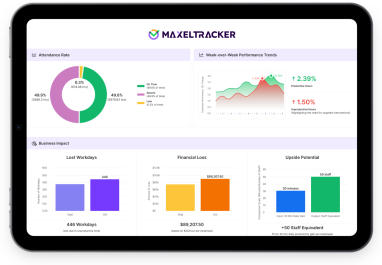
MaxelTracker is user activity monitoring software that helps you track the time spent across tasks, apps, websites, and work activities. The platform automatically tracks the time spent across work activities, creates a record of the activity data, and provides insights to make data-driven decisions to improve efficiency and productivity.
Automated time tracking: MaxelTracker automatically tracks working hours throughout the day, including clock-in and clock-out time, idle time, offline time, and extra working hours. This gives managers a clear picture of how much time is actually being spent during the workday.
Apps & websites usage tracking: MaxelTracker tracks the applications and websites employees use and the time spent on them. This helps managers understand where working time goes and identify potential distractions or inefficiencies.
Productivity tracking: MaxelTracker helps you see productive, unproductive, neutral, and idle time, along with activity logs and work patterns. Instead of just knowing how many hours someone worked, you get more context about how that time was spent.

There is no single time waster that affects every workplace equally. Common sources of wasted time include unnecessary meetings, interruptions, excessive email and messaging, task switching, repetitive work, searching for information, and poor processes. Microsoft’s Work Trend Index found that inefficient meetings were the top productivity disruptor among the issues it measured.
There is no reliable universal figure for how much time the average employee wastes each day. The amount varies significantly by role, industry, and workplace. Asana’s 2023 research found that knowledge workers spent 58% of their day on “work about work,” including coordination, communication, and managing tasks rather than skilled work.
No. Social media and personal browsing can consume working time, but they are only one source of workplace time waste. Meetings, interruptions, email and messaging, task switching, repetitive administrative work, and inefficient processes can also consume substantial amounts of working time. The biggest time drains depend on the individual and workplace.
The exact time varies depending on the person, task, and type of interruption. However, as per the commonly available research by Gloria Mark, it takes roughly 23-25 minutes to return to a task after an interruption. Repeated interruptions can therefore make it difficult to maintain sustained periods of focused work.
Related Blogs
Top AI-based Employee Monitoring Tools
As remote and hybrid work becomes the norm, employers face challenges in tracking employee productivity and accountability. AI-powered employee monitoring tools have stepped in to help, offering features like time management and productivity insights.
Employee Monitoring Software vs Data leak Prevention (DLP): Which is Better for You?
As businesses evolve, balancing security with productivity has become a top priority—especially in an era where hybrid and remote work are the norm. Organizations must protect sensitive data while also ensuring employees remain engaged and efficient.
What is Employee Monitoring Software and How Does It Work?
Employee monitoring software helps track various aspects of your employees' activities, including working hours, location, and computer usage. It’s beneficial for managing office-based, remote, or hybrid workplaces.